01 / Prioritize
Find your first call.
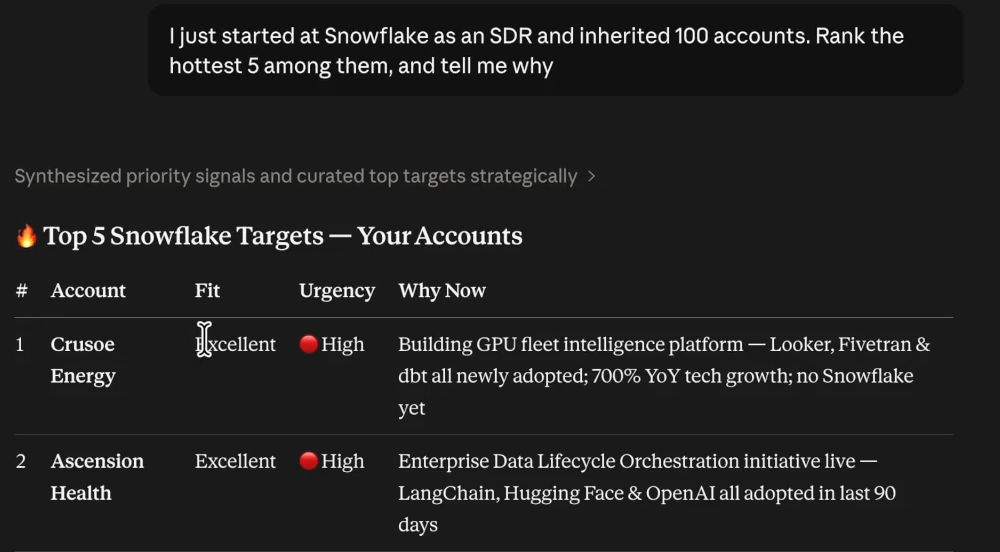
Give your AI a territory. Get a shortlist with the fit, urgency, and reason to start a conversation.
Using ATC, who should I call this week, across both my saved accounts and new prospects?
View full size Bring ATC account intelligence into Claude or ChatGPT to prioritize accounts, understand the opportunity, and draft a relevant opening.
50 free credits · No credit card required
Already have an account? Connect ATCOne conversation. Three useful next moves.
Follow the Snowflake demo from account selection to a relevant opening.
01 / Prioritize
Give your AI a territory. Get a shortlist with the fit, urgency, and reason to start a conversation.
Using ATC, who should I call this week, across both my saved accounts and new prospects?
View full size 02 / Understand
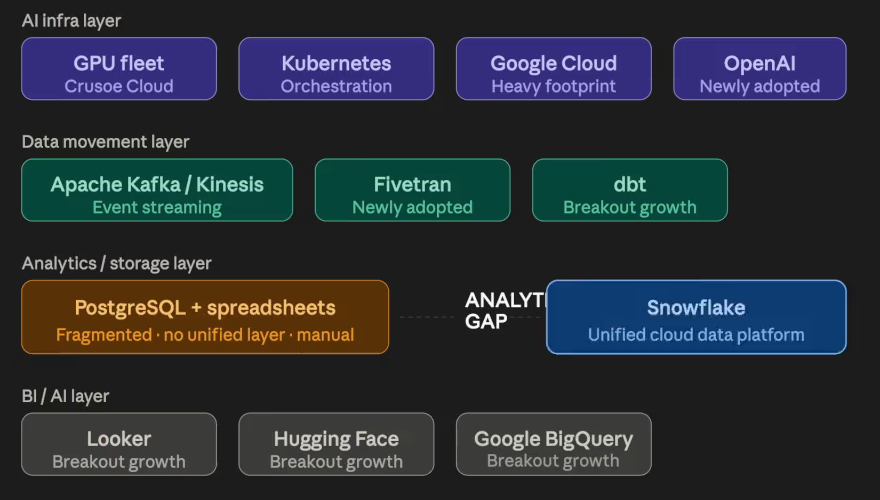
Go deeper on an account. Turn its technology context into a specific problem your product could help solve.
Using ATC, explain the biggest problem at [ACCOUNT] that [MY PRODUCT] could help solve. Show the relevant stack context and distinguish evidence from hypotheses.
View full size 03 / Approach
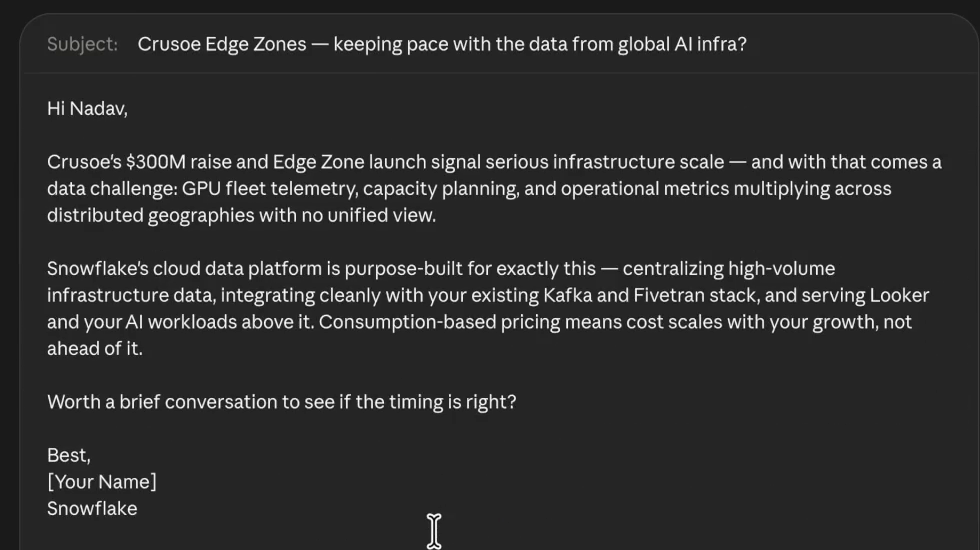
Carry the account context into an opening message. Give the buyer a concrete reason to talk.
Using ATC, draft a concise opening email to [PERSONA] at [ACCOUNT] for [MY PRODUCT]. Connect the account’s problem to a relevant angle and give me one discovery question.
View full size Screenshots from the recorded Claude demo. Account details and recommendations reflect that session.
Create your free ATC account, then connect it to the AI you already use.
Create your account, then add ATC as a Claude connector when your workspace allows custom connectors.
Start Claude setupCreate your account, then add ATC as a ChatGPT custom app when developer mode or custom apps are available.
Start ChatGPT setupUse Prospect Hub and the LLM Bundle while your administrator reviews the connector details.
Create account firsthttps://mcp.atc-analytics.com/mcpFor individual Claude users
https://mcp.atc-analytics.com/mcp, as the connector URL.https://mcp.atc-analytics.com/mcp as the ATC MCP URL.For ChatGPT users with custom apps / developer mode enabled
https://mcp.atc-analytics.com/mcp as the Connector URL.NameATCDescriptionAccount-specific GTM intelligence for account prioritization, Account Attack Plans, buying-center mapping, stack-aware motions, and outreach.Connector URLhttps://mcp.atc-analytics.com/mcpChatGPT's UI may say Apps, Apps & Connectors, or Connectors depending on rollout and plan. Workspace admins may need to enable or publish the app before users can connect it.
Open Prospect Hub, choose an account, download the LLM Bundle, and attach it to Claude, ChatGPT, or another approved model. It includes the account thesis, stakeholder context, technology signals, and suggested angles.
The ATC MCP server gives Claude or ChatGPT access to ATC account intelligence over HTTPS. Users authenticate with ATC through OAuth. ATC is not in the path of your normal chat traffic and does not receive your prompt stream.
The connector retrieves ATC account intelligence. It does not write to your CRM, email, warehouse, or internal systems.
ATC is not a prompt proxy. Claude or ChatGPT calls ATC tools only when you enable the connector for account intelligence.
Users authenticate through ATC's OAuth flow, so access is tied to an ATC account and can be governed through normal admin controls.
Tools return only the ATC resources needed for Account Attack Plans, such as briefs, stakeholders, technographics, and angles.
You may be on a Team or Enterprise workspace where an Owner must add the connector first.
Developer mode or custom apps may not be enabled for your account or workspace.
Confirm you are using the ATC account tied to your workspace and that your browser allows the auth redirect.
Refresh connector metadata in ChatGPT, or remove and re-add the connector in Claude.
The MCP server must be publicly reachable over HTTPS. Confirm the endpoint is live and not blocked by firewall rules.
Still stuck? Contact ATC support.
Create your free account, copy the public endpoint, and turn generic AI into product-specific account intelligence.